


Opened 27 minutes ago
#25112 new defect
You have encountered a bug in JOSM
| Reported by: | Owned by: | team | |
|---|---|---|---|
| Priority: | normal | Milestone: | |
| Component: | Core | Version: | latest |
| Keywords: | template_report | Cc: |
Description
What steps will reproduce the problem?
- Start JOSM
What is the expected result?
Opening and starting JOSM
What happens instead?
Can not open JOSM and got message "You have encountered a bug in JOSM".
Please provide any additional information below. Attach a screenshot if possible.
I have been using JOSM without any issues This is the first time that this happend. I have run the JOSM (debug). Report below.
WARNING: package sun.security.action not in java.base
2026-11-21 19:59:27.654 INFO: Log level is at INFO (INFO, 800)
2026-11-21 19:59:27.880 WARNING: extended font config - overriding 'filename.Malgun_Gothic=malgun.ttf' with 'MALGUN.TTF'
2026-11-21 19:59:27.881 WARNING: extended font config - overriding 'filename.Myanmar_Text=mmrtext.ttf' with 'MMRTEXT.TTF'
2026-11-21 19:59:27.882 WARNING: extended font config - overriding 'filename.Mongolian_Baiti=monbaiti.ttf' with 'MONBAITI.TTF'
2026-11-21 19:59:28.157 INFO: Detected usable IPv6 network, preferring IPv6 over IPv4 after next restart.
2026-11-21 19:59:28.533 SEVERE: java.security.KeyStoreException: Windows-ROOT not found. Cause: java.security.NoSuchAlgorithmException: Windows-ROOT KeyStore not available
java.security.KeyStoreException: Windows-ROOT not found
at java.base/java.security.KeyStore.getInstance(Unknown Source)
at org.openstreetmap.josm.tools.PlatformHookWindows.getRootKeystore(PlatformHookWindows.java:355)
at org.openstreetmap.josm.tools.PlatformHookWindows.getX509Certificate(PlatformHookWindows.java:365)
at org.openstreetmap.josm.io.CertificateAmendment.addMissingCertificates(CertificateAmendment.java:225)
at org.openstreetmap.josm.gui.MainApplication.mainJOSM(MainApplication.java:927)
at org.openstreetmap.josm.gui.MainApplication$3.processArguments(MainApplication.java:280)
at org.openstreetmap.josm.gui.MainApplication.main(MainApplication.java:766)
Caused by: java.security.NoSuchAlgorithmException: Windows-ROOT KeyStore not available
at java.base/sun.security.jca.GetInstance.getInstance(Unknown Source)
at java.base/java.security.Security.getImpl(Unknown Source)
... 7 more
2026-11-21 19:59:28.686 WARNING: Missing plugin main version in plugin mapwithai
2026-11-21 19:59:28.714 WARNING: Missing plugin main version in plugin mapwithai
2026-11-21 19:59:29.465 WARNING: Missing plugin main version in plugin mapwithai
2026-11-21 19:59:29.489 WARNING: Missing plugin main version in plugin mapwithai
2026-11-21 19:59:32.457 INFO: GET https://josm.openstreetmap.de/wiki/En_GB:StartupPage -> HTTP/1.1 200 (489 ms)
2026-11-21 19:59:32.838 SEVERE: Handled by bug report queue: java.lang.ClassCastException: class org.eclipse.parsson.JsonStringImpl cannot be cast to class jakarta.json.JsonArray (org.eclipse.parsson.JsonStringImpl and jakarta.json.JsonArray are in unnamed module of loader 'app')
java.lang.ClassCastException: class org.eclipse.parsson.JsonStringImpl cannot be cast to class jakarta.json.JsonArray (org.eclipse.parsson.JsonStringImpl and jakarta.json.JsonArray are in unnamed module of loader 'app')
at org.eclipse.parsson.JsonObjectBuilderImpl$JsonObjectImpl.getJsonArray(JsonObjectBuilderImpl.java:229)
at org.openstreetmap.josm.tools.Territories.lambda$initializeExternalData$2(Territories.java:204)
at java.base/java.util.Optional.ifPresent(Unknown Source)
at org.openstreetmap.josm.tools.Territories.lambda$initializeExternalData$0(Territories.java:203)
at java.base/java.util.Optional.ifPresent(Unknown Source)
at org.openstreetmap.josm.tools.Territories.initializeExternalData(Territories.java:201)
at org.openstreetmap.josm.tools.Territories.initializeExternalData(Territories.java:190)
at org.openstreetmap.josm.tools.Territories.initialize(Territories.java:124)
at org.openstreetmap.josm.gui.MainInitialization.lambda$beforeInitializationTasks$4(MainInitialization.java:85)
at org.openstreetmap.josm.spi.lifecycle.InitializationTask.call(InitializationTask.java:33)
at org.openstreetmap.josm.spi.lifecycle.Lifecycle.runInitializationTasks(Lifecycle.java:108)
at org.openstreetmap.josm.spi.lifecycle.Lifecycle.initialize(Lifecycle.java:73)
at org.openstreetmap.josm.gui.MainApplication.mainJOSM(MainApplication.java:1004)
at org.openstreetmap.josm.gui.MainApplication$3.processArguments(MainApplication.java:280)
at org.openstreetmap.josm.gui.MainApplication.main(MainApplication.java:766)
2026-11-21 19:59:34.416 WARNING: Could not open/create prefs root node Software\JavaSoft\Prefs at root 0xffffffff80000002. Windows RegCreateKeyEx(...) returned error code 5.


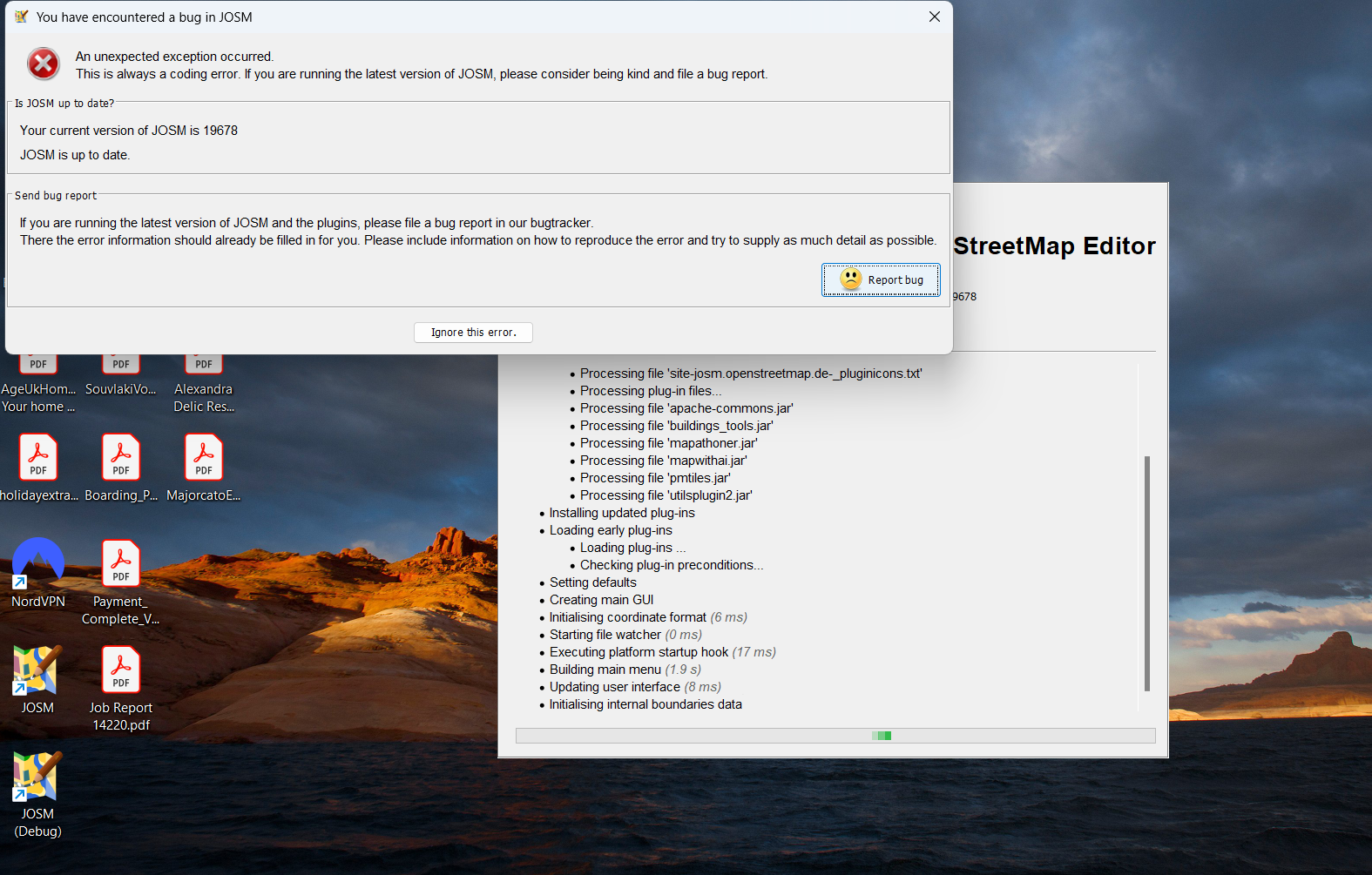
Screenshot of what happened when I try to open JOSM.