


Opened 4 months ago
Last modified 2 months ago
#24782 new enhancement
Configurable color and line width for HOT Tasking Manager task boundaries
| Reported by: | TeBaMa | Owned by: | team |
|---|---|---|---|
| Priority: | normal | Milestone: | |
| Component: | Core | Version: | |
| Keywords: | Cc: |
Description
When validating HOT Tasking Manager tasks in JOSM, the exact task boundary is displayed as a very thin light grey line, while the downloaded area is represented by a much more visible rectangular extent with the outside area shaded.
For tasks with irregular boundaries (for example along coastlines, rivers or administrative borders), the actual task boundary can be difficult to distinguish from the aerial imagery or map background. This makes it harder for validators to verify that all edits remain within the assigned task polygon.
It would be very helpful if the appearance of the task boundary could be configured, for example by allowing users to change:
- the boundary color;
- the line width;
- optionally the line style (solid/dashed).
An alternative would be to use a more contrasting default color or a slightly thicker line.
This enhancement would improve the visibility of task boundaries during validation and reduce the risk of accidental edits outside the assigned task area, especially on complex imagery or when working at lower zoom levels.
As a regular HOT Tasking Manager validator, I encounter this issue frequently, especially when validating tasks with complex polygon boundaries.
Thank you for considering this enhancement.


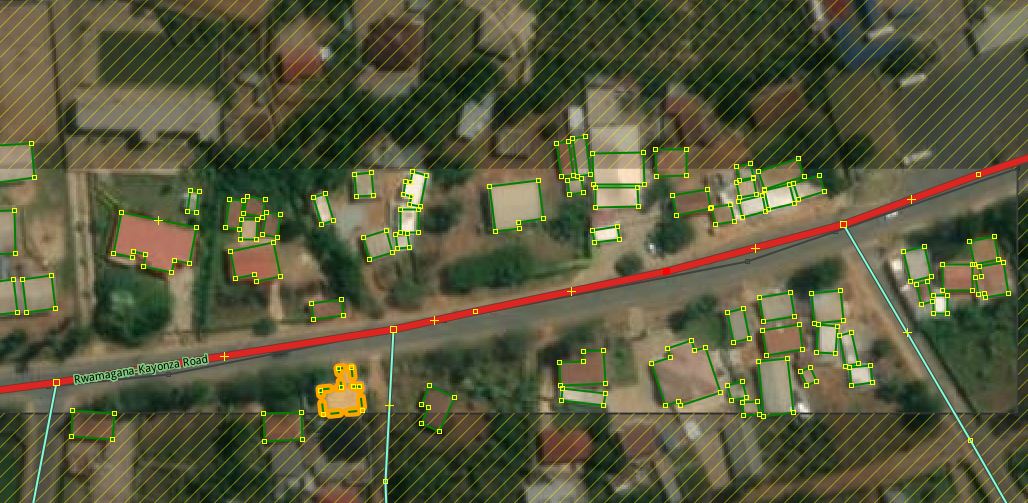
I will give an example; find the task boundary in the task in the attachment.