


| Version 5 (modified by , 17 months ago) ( diff ) |
|---|
Az oldal fordítása még nem teljes.
Más nyelveken:
Eszközök > Vonalak szétválasztása
 Gyorsbillentyű:
 G
Megduplázza a több vonal által érintett pontokat.
Ez lehetővé teszi két (vagy több)  vonal (en) szétválasztást, melyek
  pontjai (en) közösek. A kijelöléstől és a közös pontokkal rendelkező vonalaktól függően az eredmény eltérő lehet. A művelet után általában az összes újonnan létrejövő pont ki lesz jelölve.
- with a single node selected, all ways will be unconnected. One way will keep the original node and all other ways will each get a new node instead at the identical location. One of the new nodes will be selected which might change in future, see #20884.
- Note: with a single tagged (en) node only part of one way, the node will be isolated and moved. A new node will be inserted in the way at the identical location. The originally selected node stays selected.
- Note: with a single tagged (en)
- with a single way selected, the way will be unconnected from all other ways and all former shared way's nodes will be replaced with new nodes at the identical location. All new nodes will be selected.
- with one way and nodes selected, all selected shared nodes of the selected way will be replaced with new nodes at the identical location. Selected nodes which are only part of the selected way are silently ignored. All new nodes will be selected.
Depending on the selection, a Unglue confirmation dialog and/or a Tags/Memberships choice dialog might raise.
Additionally, there a some Notifications which might be displayed.
Unglue confirmation dialogs
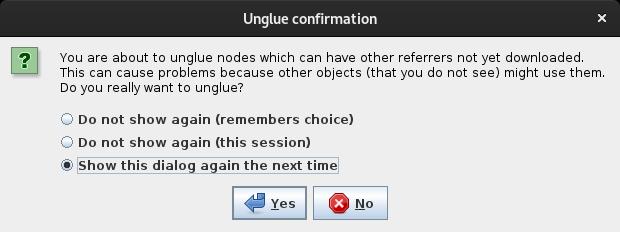
- If there is no download area or any involved node is outside download area the following confirmation dialog will be presented with the usual options to remember ones choice.
You are about to unglue nodes which can have other referrers not yet downloaded.
This can cause problems because other objects (that you do not see) might use them.
Do you really want to unglue?
- ???
You are about to unglue incomplete objects.
This will cause problems because you don't see the real object.
Do you really want to unglue?
Tags/Memberships choice dialog
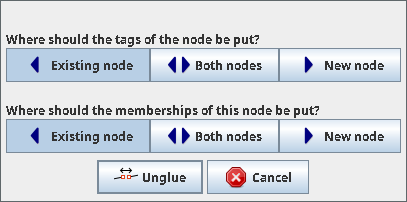
If any shared node involved in this action has a tag (en) or is member of a  relation (en) a dialog to choose where the tags and, optionally, the relation memberships, should be placed. The option are:
- Existing node: The tags or memberships remain on the original node
- Both nodes: The tags or memberships remain on the original node and are additionally added to the new nodes.
- New nodes: The tags or memberships are moved onto the new nodes.
Notifications
Following notifications might be displayed:
- If the single selected node is not part of any way:
This node is not glued to anything else. - If none of the selected nodes is part of another way:
None of these nodes are glued to anything else. - If none of the selected way's nodes is part of another way:
None of this way's nodes are glued to anything else. - If the current selection does not fit the demands for this action:
The current selection cannot be used for unglueing.

Select either:
* One tagged node, or
* One node that is used by more than one way, or
* One node that is used by more than one way and one of those ways, or
* One way that has one or more nodes that are used by more than one way, or
* One way and one or more of its nodes that are used by more than one way.

Note: If a way is selected, this way will get fresh copies of the unglued nodes and the new nodes will be selected.
Otherwise, all ways will get their own copy and all nodes will be selected.
- If any relation might be affected:
Unglueing possibly affected [number] relations:
Ensure that the relations have not been broken!
Példák
Jelöld ki bármelyik pontot, majd használd az eszközt.

Egy új pont jön létre mindegyik vonalhoz az eredeti ponttal megegyező helyen.
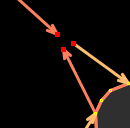
- Ha a kijelölt ponton van legalább egy címke, és a pont csak egy vonalnak tagja, a pontot leválasztja a vonalról és a helyére egy új pontot illeszt be.
Szakértői használat: Ha kettőnél több vonal osztozik egy ponton, de csak az egyiket szeretnéd leválasztani, a pont mellett ezt a vonalat is jelöld ki.
You might be asked to choose where the tags or/and relation memberships should be placed, see Tags/Memberships choice dialog, above.
Lásd még


Vissza ide: Menü / Eszközök
Vissza a Főmenühöz
Vissza a Súgó főoldalára
